






















Description
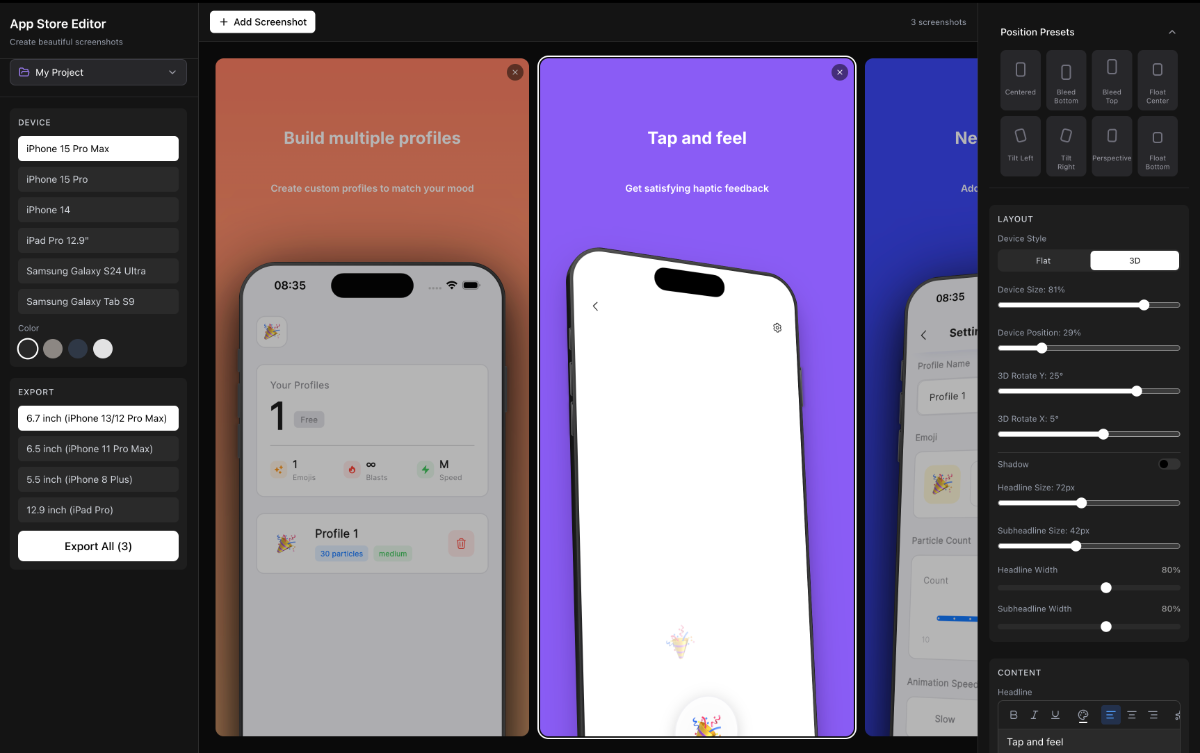
📱 6 Realistic Device Mockups. iPhone 15 Pro Max, iPhone 15 Pro, iPhone 14, iPad Pro 12.9", Samsung Galaxy S24 Ultra, and Samsung Galaxy Tab S9 — each with accurate camera elements (Dynamic Island, notch, punch-hole) and multiple frame colors. 🧊 Flat & 3D Rendering. Toggle between a classic 2D frame and a perspective 3D view with visible device edges.…
Preview
Information
People also visit
Apps people often open alongside Appshots.
Appshots FAQ
What is Appshots?
📱 6 Realistic Device Mockups. iPhone 15 Pro Max, iPhone 15 Pro, iPhone 14, iPad Pro 12.9", Samsung Galaxy S24 Ultra, and Samsung Galaxy Tab S9 — each with accurate camera elements (Dynamic Island, notch, punch-hole) and multiple frame colors. 🧊 Flat & 3D Rendering. Toggle between a classic 2D frame and a perspective 3D view with visible device edges.
Is Appshots free?
Yes. Appshots is free to use.
Do I need to download Appshots?
No. Appshots runs in your browser at appshots.appstate.xyz, so there's nothing to install.
What are the best Appshots alternatives?
Popular alternatives to Appshots include MTVP, Airclap and TypeAnySymbol. See all Appshots alternatives